 Folderloom by Knoveya
FOLDERLOOM · CLAUDE FOLDERS
Claude Folders for a Clearer Conversation Workflow
Give Claude conversations a project structure you can keep using when your history grows.
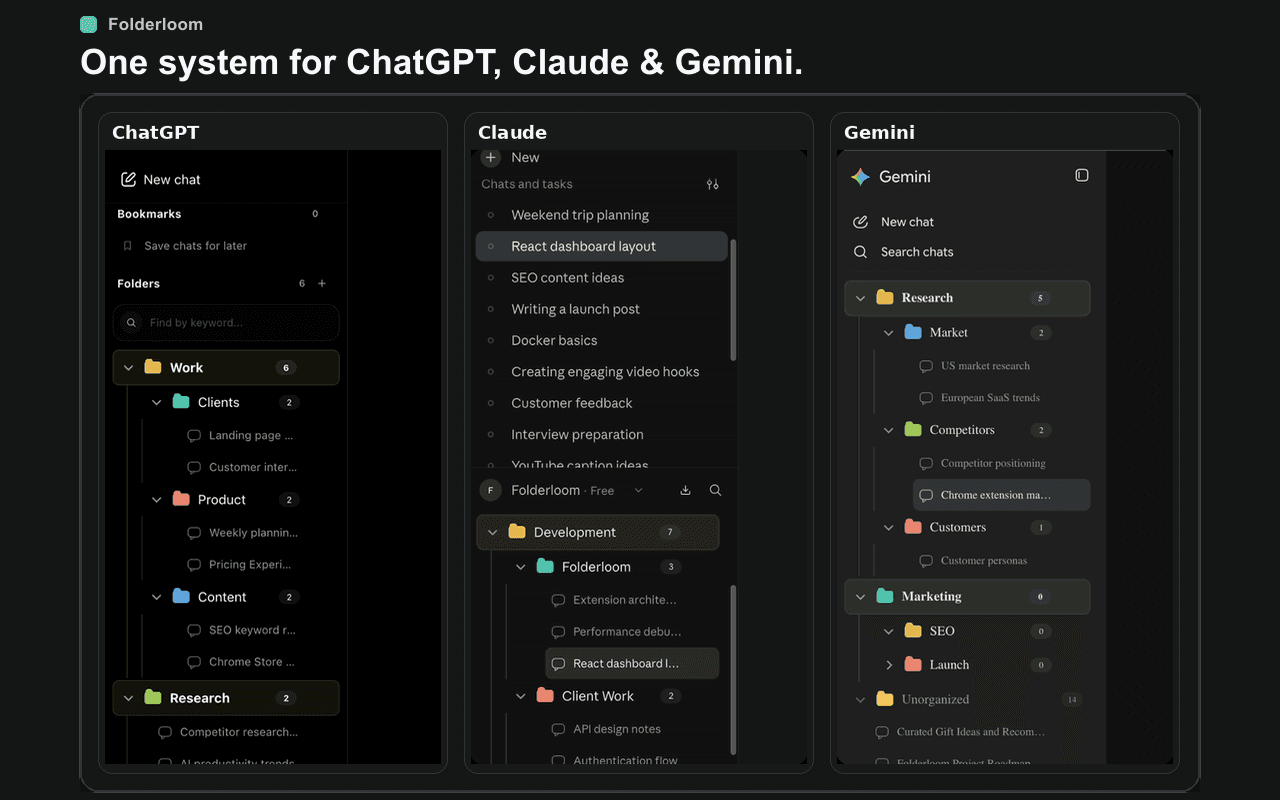
Organize Claude work around the project
Claude conversations often move between planning, drafts, analysis and feedback. Grouping them by project makes the next useful thread easier to recognize than a provider-only history list.
A small tree such as Work → Client → Research is usually enough. Add depth only when a folder becomes difficult to scan.
Folders, bookmarks and search
Folderloom adds nested folders and bookmarks to the Claude sidebar, then lets you search the folder names and visible chat titles locally. Drag and drop keeps maintenance quick when a project changes shape.
The extension stores organization metadata in Chrome local storage. It does not turn Claude conversations into a cloud backup.
A cross-AI habit that survives tool changes
Use the same project names in ChatGPT, Claude and Gemini. When you switch providers, the organizational cue stays familiar even though each provider keeps its own conversation history.
Keep the final draft easy to recognize
A writing project can accumulate several nearly identical conversations. Use meaningful titles in Claude where possible, then let folders describe the work stage and bookmarks identify the thread you actively use. This avoids relying on a long list of dates to choose the right draft.
Folderloom does not replace Claude's own project context or carry uploaded files into another conversation. Its live release organizes sidebar references only. Prompt Library and reviewed Continue across AI drafts are planned for 0.4.0, not part of the current 0.3.1 install.
When a conversation is not in the tree
Check that you are in the expected Claude account and Chrome profile, and that the conversation is available in the provider interface. Local search uses folder names and chat titles, not the full contents of every Claude conversation.
Keep important source material with your normal project files. Local organization is a convenience for retrieval, not a copy of Claude's conversation history.
Try a small organization routine
- Open Claude in Chrome after installing Folderloom. Begin with a single writing or analysis project instead of reorganizing the entire history.
- Create a folder named for the deliverable, such as Quarterly report. Place the source analysis and first draft conversations inside it.
- Separate Drafts from Review only when each has enough chats to make the split useful. Use drag and drop or Move to folder.
- Bookmark the conversation with the latest accepted revision, not every experiment.
- Search for a distinctive word from the chat title before starting a duplicate thread.
Example project structure
Quarterly report
  Analysis
  Drafts
  Review
Reference